25 MARCH 2026
Welcome to the Orchestration AI Release Notes.
As they become available, additions and updates to these release notes can be found here.
What's in the Release Notes?
- About Orchestration AI
- What's new in Orchestration AI?
- New features
- General enhancements
- Breaking change
- Resolved issues
- Deployment
About Orchestration AI
Orchestration AI solution facilitates Agentic AI capabilities, bringing intelligent, context-aware assistance into rapid creation of business process applications that work on top of legacy systems to orchestrate best-of-breed digital solutions, and harness human expertise.
Orchestration AI combines process orchestration with analytics, AI, RPA, and Agentic AI, and enables organizations to automate tasks, support decision-making, and dynamically adapt to changing business conditions. Built on cloud infrastructure and enhanced for Azure and Power Platform, the solution delivers increased value not just in the case management but other domains too.
With Orchestration AI, an organization can transform customers’ experience, increase self-service actions, and gain greater operational visibility. The Agentic AI capabilities further enhance these outcomes by providing real-time insights, guiding users through complex processes, and reducing manual effort. The solution enables companies to respond to evolving business and regulatory requirements with greater agility, while lowering development time and cost.
What's new in Orchestration AI?
Orchestration AI V11.1 introduces the ultimate productivity tool that will revolutionize the way you work and save you valuable time. Main benefits include:
- Agentic capabilities with agentic services integrated with our solution.
- New look and feel with new React-based UI.
- Enhanced user experience with reduced case processing time.
- Enhanced case conversations.
- Extended support to Azure Key Vault storage.
- Support for Integration with Azure Application Insights to retrieve portal usage statistics and user flows.
NOTE
Agentic Fabric and advanced AI capabilities are available primarily as part of the Genpact-hosted SaaS offering. Features marked with an asterix (*) are SaaS offering.
On-premises deployments continue to receive core platform enhancements, maintenance updates, and version upgrades.
New features
- *Agentic capabilities: The system brings the following intelligent agentic capabilities that go beyond traditional workflows. These capabilities combine automation with autonomous decision-making and continuously optimize operations.
NOTE
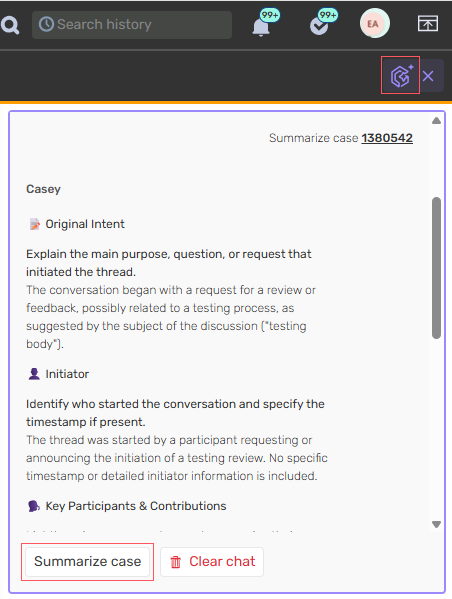
This feature is available only for select deployments hosted on Genpact cloud service.- Agentic Case Experience Prototype: As part of AI capabilities, we have introduced an AI-driven assistant that enables one-click case summarization using the “Summarize Case” option.
- Agentic Fabric Server: We have added an Agentic Fabric, a core layer for agent‑to‑agent communication and send prompts to internal agents.
For details, see this article.
- Agentic Case Experience Prototype: As part of AI capabilities, we have introduced an AI-driven assistant that enables one-click case summarization using the “Summarize Case” option.
- Deployment with Azure DevOps for Workflows, ConfigSets, Solutions, Dashboards, Shared views:
- Commit and deploy Orchestration objects with Azure DevOps repository.
- New deployment wizard for all Orchestration objects.
- Advanced Portal configuration via config set: Introduced new enhanced capabilities to tailor different portal components like workflow explorer, menus, grids, and themes via config set.
- Configure Workflow explorer via config set: As a workflow developer, you can update the portal configuration of the workflow explorer through config set. Use the Config Set editor to manage your customizations of how forms are displayed in runtime.
For details, see this article. - Customize menu items, color palette and grids via config set: As a workflow developer, you can customize various portal components through config set. Use the Config Set editor to customize menu items, color palette and portal grids.
For details, see this article.
- Configure Workflow explorer via config set: As a workflow developer, you can update the portal configuration of the workflow explorer through config set. Use the Config Set editor to manage your customizations of how forms are displayed in runtime.
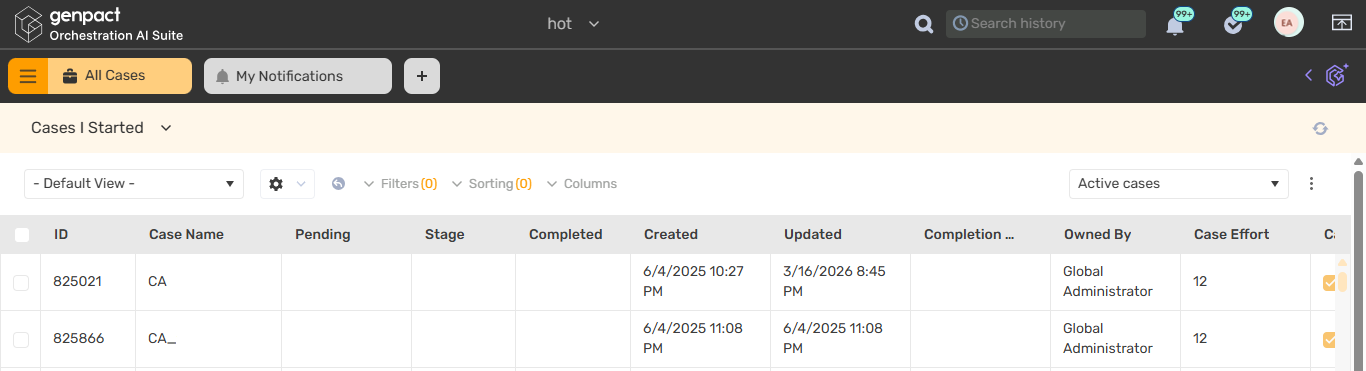
- Enhanced User Interface and Experience (UI/UX): Introduced a modernized React-based UI for the portal, also aligned to the Genpact's latest branding palette.
What's new:- New color and theme palette aligned with Genpact's latest branding.
- Faster page loading and improved responsiveness.
- Enhanced overall experience for end users/business users.
General enhancements
- Case attachment enhancements: We have introduced new built-in command activities to edit case attachments and remove case attachments based on file Ids.
For details, see this article and this article. - Enhanced Integrations Dashboard: As part of enhancing the existing functionality, we have:
- Included display and monitoring of more integrations like Kafka connections and File connections to the Integrations Dashboard.
- Improved validation for endpoints of File transfer connection, Elasticsearch, and Email Listener.
For details, see this article. - Introduced proactive endpoint health check with automatic integration validation job.
- Email Editor: The email editor recipient validation now requires at least one recipient in either of the To/Cc/Bcc fields, instead of mandatory recipient in the To field.
Breaking change
To enable using the SQL always encrypted encryption capability in the Orchestration AI app, you need to configure the following in all application config files:
<sequence.engine>
    ...
        <azureServices>
            <data clientId="12341234-1234-1234-1234-123412341234" clientSecret="secretsecretsecretsecret" tenantId="12341234-1234-1234-1234-123412341234" />
        </azureServices>
    ...
</sequence.engine>
Resolved issues
| Component | Issue | Ticket # |
|---|---|---|
| Analytics | Analytics dashboard opened the item list in the same portal page instead of in a new browser tab/window. | 3538143 |
| Portal | Case name list order was incorrectly sorted by the Workflow name instead of the Workflow alias. | 4860552 |
Deployment
Download the release package from the Cora Orchestration repository.
NOTE
Contact Support to obtain credentials to access the repository.
There are six pre-built application deployment packages available, depending on the type of application that you are deploying. You install each Cora Orchestration application separately.
| Site applications | Service applications |
|---|---|
|
|
 Click here to see how to deploy pre-built applications.
For more details on installing and deploying applications, see this article.
Check if you need to upgrade your database for this version.
For more information on database upgrade and post-upgrade procedures, see this article.
Before upgrade, make sure that you update the PowerShell modules to the relevant version.
For more information, see this article.
Click here to view a sample PowerShell script. Consider this sample for reference only, and do not copy paste from it.
IMPORTANT
Use Microsoft SQL Server Developer Edition for development purposes only.
During upgrade, all product application folders are deleted and redeployed:
- Web and App config files are overwritten in each release. You need to reapply your custom configuration settings after the upgrade.
- All custom files located in the application folders are also deleted. Custom files should be packaged as a custom application NuGet.
Files in the central configuration location are not changed.
For more details, see this article.
For details on Cora Orchestration platform support, see this article.
